筆者都無法使用 OpenCV 和 FFmpeg 庫在 IPCam 上,可能是筆者功力有限,未能夠用 OpenCV 和 FFmpeg 庫在網絡上,所以要使用 CSharp(C#)加上 AForge 庫,因為兩者都是支持 .NET 的,相信會很容易篇程在網絡攝影機(IPCam),而且在 USB WebCam 試驗 AForge 庫都很順利,應該是不會太難!
Step by Step:
步驟 1:在 Visual Studio 2010 中建立 Visual C# Windows Form 應用程式
應用程式設定(名稱:01_AForge_webcam) |
| Visual Studio 2010 → 檔案 → 新增 → 專案 |
 |
| Visual C# → Windows Form 應用程式 → 專案名稱(02_AForge_ipcam)→ 確定 |
 |
| 專案 → 加入參考 |
 |
| 選擇 AForge.Video.DirectShow.dll、AForge.Video.dll 和 AForge.Control.dll → 確定 |
 |
| 在參考的檔案夾出現 AForge.Video.DirectShow.dll、AForge.Video.dll 和 AForge.Control.dll |
|
| 按工具箱 |
 |
| 選擇工具箱 → 通用控制項 → 鼠標右鍵選擇 → 選擇項目 |
 |
| 瀏覽 |
 |
| 選擇 AForge.Conrol.dll → 確定 → 確定 |
 |
| 工具箱出現了 AForge 的控制項 |
 |
| 放置不同的控制項在 Form1 內 |
Button1 – System.Windows.Forms.Button
Button2 –System.Windows.Forms.Button
fpsLabel – System.Windows.Form.ToolStripStatusLabel
MainForm – System.Windows.Forms.Form
mainPanel – System.Windows.Forms.Panel
openFileDialog – System.Windows.Froms.OpenFileDialog
statusStrip – System.Windows.From.StatusStrip
timer – System.Windows.Timer
videoSourcePlayer –
Afroge.Controls.VideoSourcePlayer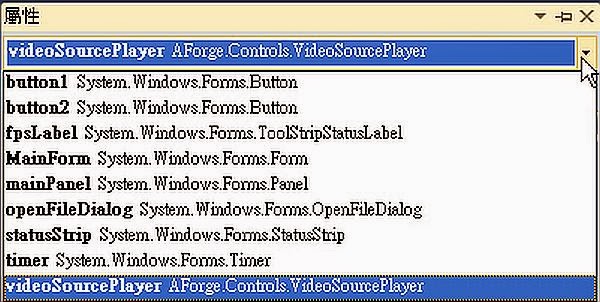 |
| 控制項 |
 |
| 按鼠標右鍵 → 檢視程式碼 (F7) |
 |
| 鍵入程式碼 |
02_AForge_ipcam
CSharp Form1.cs 程式:
// Form1.cs
using System;
using
System.Collections.Generic;
using
System.ComponentModel;
using System.Data;
using
System.Drawing;
using System.Linq;
using System.Text;
using
System.Windows.Forms;
using
System.Diagnostics;
using
AForge.Video;
using
AForge.Video.DirectShow;
namespace
_02_AFroge_ipcam
{
public partial class Form1 : Form
{
private Stopwatch stopWatch = null;
// Class constructor
public Form1()
{
InitializeComponent();
}
private void MainForm_FormClosing(object
sender, FormClosingEventArgs e)
{
CloseCurrentVideoSource();
}
private void button2_Click(object
sender, EventArgs e)
{
this.Close();
}
private void button1_Click(object
sender, EventArgs e)
{
// create video source
MJPEGStream mjpegSource = new
MJPEGStream("http://192.168.0.108:8080/?action=stream");
// open it
OpenVideoSource(mjpegSource);
}
// Open video source
private void OpenVideoSource(
IVideoSource source )
{
// set busy cursor
this.Cursor = Cursors.WaitCursor;
// stop current video source
CloseCurrentVideoSource( );
// start new video source
videoSourcePlayer.VideoSource =
source;
videoSourcePlayer.Start( );
// reset stop watch
stopWatch = null;
// start timer
timer.Start( );
this.Cursor = Cursors.Default;
}
// Close video source if it is
running
private void CloseCurrentVideoSource(
)
{
if (
videoSourcePlayer.VideoSource != null )
{
videoSourcePlayer.SignalToStop(
);
// wait ~ 3 seconds
for ( int i = 0; i < 30;
i++ )
{
if (
!videoSourcePlayer.IsRunning )
break;
System.Threading.Thread.Sleep(
100 );
}
if (
videoSourcePlayer.IsRunning )
{
videoSourcePlayer.Stop(
);
}
videoSourcePlayer.VideoSource
= null;
}
}
// New frame received by the player
private void
videoSourcePlayer_NewFrame( object sender, ref Bitmap image )
{
DateTime now = DateTime.Now;
Graphics g = Graphics.FromImage(
image );
// paint current time
SolidBrush brush = new
SolidBrush( Color.Red );
g.DrawString( now.ToString( ),
this.Font, brush, new PointF( 5, 5 ) );
brush.Dispose( );
g.Dispose( );
}
// On timer event - gather statistics
private void timer_Tick( object
sender, EventArgs e )
{
IVideoSource videoSource =
videoSourcePlayer.VideoSource;
if ( videoSource != null )
{
// get number of frames since
the last timer tick
int framesReceived =
videoSource.FramesReceived;
if ( stopWatch == null )
{
stopWatch = new
Stopwatch( );
stopWatch.Start( );
}
else
{
stopWatch.Stop( );
float fps = 1000.0f * framesReceived /
stopWatch.ElapsedMilliseconds;
//fpsLabel.Text =
fps.ToString( "F2" ) + " fps";
stopWatch.Reset( );
stopWatch.Start( );
}
}
}
} // public partial class Form1 : Form
}
|
步驟 6:偵錯
 |
| 偵錯 → 開始偵錯(F5) |
 |
| 顯示 IPCam 的圖像! |
相關網址:
※ 在 Windows XP 安裝 AForge 2.2.4 使用 C# 作 IPCam 篇程2015 年 2 月 21日 天氣報告
氣溫:20.8 度 @ 20:50
相對濕度:百分之 90%
天氣:多雲

沒有留言:
張貼留言